GSAK (Geocaching Swiss Army Knife)
 

Contents - Index


Macros (automating GSAK) 

Jump to: command/function summary   database variables   system variables

GSAK has automation or macro (or scripting) support in the form of a macro language. Macros comprise of lines of code written to a plain text file. The default extension for a GSAK macro is .gsk. You can create a macro file using a text editor such as GSAK's macro editor. The lines of the  macro can include commands, variables, expressions and internal functions.  

The difference between a command and a function can sometimes be confusing. Basically a command (other languages often refer to this as a "procedure") does not return a value where as a function does. Other properties that help to differ between the two:
1. Functions can be used in expressions (expressions are used in IF, While, Set commands). Commands cannot. 
2. Functions can be nested within each other, commands cannot. Example: alltrim(left(upper('abcd'),2))
3. Functions have fixed parameters and all parameters must be included
4. Function parameters are always enclosed in brackets and separated by commas.
5. Commands have named parameters (some with default values), and can include/exclude optional parameters.
6. Command parameters do not support expressions, only literals and variables.

Nested conditional statements in the form of IF and WHILE (for looping) are also supported, as is the ability to interrogate system variables and database variables as well as being able to update many of them. Variable substitution is also supported. For communication between macros  GSAK also supports persistent variables.

You can find real world working macros here

Once the lines of text of a macro have been created, these are saved in a plain-text file. It is recommended that you save all your macros in the "Macro" folder of your install folder of GSAK. Saving them there ensures that they are backed up and restored when using the GSAK backup and restore features.

A macro file can be run from within GSAK (Macro=>Run, or Ctrl-M) or from the command line when starting GSAK. You can also allocate macros to tool buttons for easy execution. You can even have GSAK automatically execute a macro on start up - see Tools=>Options=>Advanced

To run a macro when starting GSAK from the command line:

GSAK /run "c:\some folder\commands.txt". 

/run = the first parameter on the line to indicate GSAK is to automatically run all the commands in the file designated by parameter 2

Note: As from 7.1 the syntax has changed to GSAK "c:\some folder\macro.gsk" /run. The old run syntax is still supported, but will only run the macro if GSAK is not already running. The new syntax will run the macro even when GSAK is already active, however this will only work with the new 7.1 macro extension of .gsk 

The file name only needs to be surrounded by quotation marks if the path to the file contains any spaces. The file is just a plain ASCII text file and may contain the commands in any order:

Command Syntax - Parameters are surrounded by <> (do not include these when creating a macro) and items in square brackets([ ])  are optional. Valid options for parameters are separated by | (piping symbol). All commands and parameters are not case sensitive. Blank lines are ignored.  Comments can be inserted by using the # symbol. Having a comment on the same line as a command is also supported but the # symbol must be at the very end of the command. With command parameters, the data following the = (equal sign) is accepted verbatim as the parameter value. Only when using an expression can you have optional spaces before and after the = sign. For example:
 
# This macro will do bla, bla
$x = 0
Goto Position=Top
While not($_EOL)  # Loop through the entire file
  $x = $x + 1 # count the number of waypoints
  Goto Position=Next
EndWhile
# Show total number recs
Pause Msg=$x


Command names and mandatory parameters are validated. When GSAK encounters an invalid command or missing parameter the macro will abort with an error message. For example if you used the command DEBUG Statux=on (Notice the parameter has been incorrectly spelt as Statux instead of Status) you would get the following error message. 
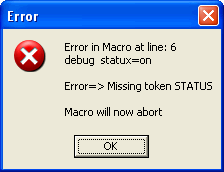


You can use GSAK variables in all commands but expressions can only by used in the SET, IF, MFILTER and WHILE commands. For example:
 
SET $FileName = $_Install + "\test.GPX"
LOAD File="$FileName"


Is valid, but the following is not, because the contents after File= is an expression. 
 
LOAD File=$_Install + "\test.GPX"


If you want to use an expressions in a command this manner, then just allocate the expression to a variable first, then use that variable in the command.

Command/Function Summary (Green=Command, blue=function)
  
AbsReturns an absolute value of a number
AddNew          Add a new record to a table
AlltrimRemove spaces before and after a string
Appendfile   Append data to an existing file
ArcCos          Calculates the inverse cosine of a given number
ArcCosh         Calculates the inverse hyperbolic cosine of a given number
ArcSin          Calculates the inverse sine of a given number
ArcSinh         Calculates the inverse hyperbolic sine of a given number
ArcTan          Calculates the arctangent of a given number
ArcTan2         Calculates the arctangent angle and quadrant of a given number
ArcTanh         Calculates the inverse hyperbolic tangent of a given number
ArrayArray function for array support
Asc             Return the ascii value of a character
At              Get the position of string found in another string
BoolToStr        Convert Boolean value to a string
Backup          Backup GSAK databases(s) and settings
BeginCase        Begin a group of CASE statements
BeginSub        Begin a subroutine
Break           Exit out of the current WHILE loop
CacheMate       Load CacheMate logs and finds from a CM2GPX generated file
CacheType           Returns expanded version of 1 letter cache types from $d_CacheType
Cancel          Cancel the macro and return to the GSAK GUI
CancelFilter    Cancel the current filter
Case        CASE statements
Centre          Set the current centre point
Choose          Select from a list of choices
Chr             Convert a decimal value to its ASCII equivalent
Clip            Copy information to the windows clipboard
CodeMatch      Optimized database code matching
Cos             Calculates the cosine of an angle
Cosh            Calculates the hyperbolic cosine of an angle
Database        Select, create, delete a database
DatabaseExists  Test to see if a GSAK database exists
DataRestore     Restore saved database fields
DataSave        Save database fields
DateDiff        Find the number of days between two dates
DateFormat      Convert a date to string using current system date settings
DateToSQL      Convert a date to SQL() date format
DateToString    Reverse of the StringToDate function
DBToSQL      Database data to SQL conversion
Debug           Debug a macro script
Declare          Declare a variable
DegToRad           Convert angles expressed in degrees to the corresponding value in radians
Delay           Delay the running of a macro by milli seconds
Delete          Delete waypoint(s) from the current database
Editform        Edit a GSAK form
Else            Execute statements for the false condition of an IF command
EndRead         See the FileRead command
EndSub          End a subroutine
Eval            Evaluate/convert a string with special tags
Exit            Exit GSAK (not just the macro but the whole program)
ExitSub         Exit a subroutine
Exp             Exp returns the value of e raised to the power of X
Export          Export any of the GSAK supported file types
Extract         Extract part of a string from another given a delimiter
FileCopy        Copy a file
FileErase       Erase file(s)
FileExists Test if file exists in fully qualified path
FileOpen  Open a file
FileRead        Read a text file line by line
Filter          Select a saved filter
FolderExists    Test if a folder/directory exists
Form        Show a GSAK form
Frac            Get the fractional part of a number
GCalc           Calculations using longitude and latitude
GeoCalc         Calculations using longitude and latitude (Deprecated)
GetClipText           Get the current clipboard text
GetEnvV         Get value of a system environment variable
GetFile         Read the contents of a disk file
GetMail         Allows you to download attachments from a POP3 mail account
GetNear           Get a list of the nearest waypoints to a given coordinate
GetSpecial      Get the value of any special tag(s) - Deprecated
GoSub           Call a subroutine
GoTo            Position the current waypoint in the grid
Grab            Grab coordinates adding waypoints to current database
HttpEncode             HttpEncode a string
HTML             HTML generation helper
If              Run macro commands only if a certain condition exists
Include         Insert a code file into a macro
Input           Prompt user for data and assign to a variable
Int             Get the integer portion of a number
IsEmpty         Test if a string is empty
IsOwner           Ownership of the current cache or log
Keep           Convert a string by keeping only required characters or data in a string
Left            Get the left most characters of a string
Len             Get the length of a string
List            Manipulate lists (Array like support)
Ln              Get the natural logarithm of a number (Ln(e) = 1)
Load            Load a GPX/loc/zip file into the database (or folder of these files)
Log             Get log base n of a number
Lower           Convert a string to all lower case
Macro           Run another macro (subroutine)
MacroDelete         Delete records from Caches, Waypoints, or Logs
MacroFlag       Set/Clear macro flags
MacroSet        Update dialog settings from within a macro
MFilter         "On the fly" macro filter
MimeDecode      Mime decode a string
MimeEncode      Mime encode a string
MoveCopy        Move or Copy waypoints from one database to another
MsgOK         Simple message box with single OK button
NumToStr        Convert a number value to a string value
Option          Request explicit declaration of variables or not
Pause           Pause the macro (with message)
PlayWav         Play a WAV sound file
PreProcess            Interrogate the status of the Shift and Ctrl keys and macro start up)
PurgeLogs       Purge out required log records from a database
PurgeNote       Purge/delete out details from user notes
PutFile         Write a file to disk
Quote           Enclose a string in double quotes
RadToDeg           Convert angles measured in radians to degrees
RegEx           Use a regular expression to find a string in another string
RegExCount      Count the number of times a regular expression is found in a string
RegExData       Return the matching data of a regular expression
RegExEscape     Escape data so can search as plain text
RegExReplace    Replace matching regular expression with a string
RegExSub        Retrieve the matching sub expression
Remove           Convert a string by removing required characters or data
RemoveVar        Remove a macro variable from memory
Replace         Global replace of data fields
Replace         Replace one string with another
RestoreFilter   Restore filters settings saved by SaveFilter
ReSyncLogs         Resyncronize your logs with the GSAK database
Return          Exit the current macro file only
RGBColor       Convert RGB color values to a number to use in SetColor command
Right          Get the right most characters of a string
Round           Round a number to N decimal places
ROT13        ROT13 encode/decode a string
RunPgm          Run any external program
SaveFilter      Save filter settings to restore later with RestoreFilter function
Seek            Quickly position or find a code
Set             Create or assign the value of an expression to a variable (Deprecated)
SetColor        Set colors for rows or columns
Showform        Show a GSAK form (Deprecated, see Form()
ShowStatus      Show the status of a macro command
ShowStop        Show a stop dialog when running a macro so you can cancel the macro at any time
Sin             Calculates the sine of the angle in radians
Sinh            Returns the hyperbolic sine of an angle
SmartName       Calculate a "smart name" for any string
Sort            Sort data by any column or columns
SpeedMode       Turns macro speed mode on or off
SplitScreen     Turn on/off split screen display
SQL             Quick and dirty SQL engine (simulate arrays)
SQLToDate      Convert a SQL() date string to a macro date
SqlToHtml       A quick and easy way to view SQL data
Sqr             Returns the square of a number
Sqrt            Returns the square root of a number
StopRead        Terminate FILEREAD
Str             Converts a number into a right justified string with decimals digits following the decimal point
StrToBool        Convert a string value to Boolean
StringToDate    Convert a string literal to a date type variable
SubStr          Get a substring from a string
SysInfo         Retrieve system information
Table           Select the active table (Caches, Logs, Waypoints)
Tan             Calculates the tangent
Tanh            Calculates the hyperbolic tangent
TextOut         Generate CSV and tab delimited text files
Time            Returns the system time as a string in the form HH:MM:SS
Timer           Macro stopwatch
TotChild        Get the total number of child waypoints
Trim            Removes trailing spaces from a string expression
Upper           Convert a string to all uppercase
UserFlag        Set/Clear user flags
UTF8        UTF8 encode/decode a string
UTF16        UTF16 encode/decode a string
Val             Convert a string to a number
VarExists        Test for existence of a variable
VerCheck        Check GSAK version macro can run under
View            Select a GSAK grid view
Vsub            Toggle variable substitution on and off
Web             Run any URL and show in current browser
While           Run macro commands while a certain condition exists (looping)
ZipFile        Zip File zip/unzip support
<Data>          Static allocation of large text to a variable


__________________________________________________________________________
Examples:
__________________________________________________________________________

The example commands are in uppercase for clarity only. All commands, and parameters are NOT case sensitive.

Keeping it simple, all exports will use the exact same settings as per your last export for that format. 

As we are trying to automate commands with no user interaction, message boxes have been suppressed. This includes warnings about files already existing (they will automatically be overridden) and summary totals when loading a GPX file.

Example 1,  from the command line load a GPX file, export to Ozi, then exit GSAK:
 
GSAK /run c:\temp\clyde.txt

Commands in clyde.txt
 
# Load latest pocket query of my finds into Ozi explorer, then exit GSAK
LOAD file=c:\temp\latest.GPX
FILTER name="Only found caches"
EXPORT Type=Ozi File="c:\temp\test.wpt"
EXIT


Example 2 - Combine the results of multiple filters (enter into a text file, then run via File=>Run Macro)
 
#example of macro to combine the results of 3 different filters
# load first filter
FILTER name="filter1"
# load second filter
FILTER name="filter2" join=or
# load the 3rd filter
FILTER name="filter3" join=or
If $_FilterCount = 0
  Cancel Msg="Sorry, there are no records in your combined filters"
EndIf

 
Example 3 - Send waypoints to GPS with different custom icon overrides. (For this to work you must have set up icon override settings for the various overrides using the "All waypoints" override)
 
# example of macro to send override icons to GPS
#Load first filter condition
FILTER name="Found by my friend Bozo"
EXPORT type=gps settings="set icon to funny face"
# Load second filter condition
FILTER name="Difficulty 5 caches"
EXPORT type=gps settings="set icon to sad face"


Example 4 - For a complete macro that will enable you to do a "Cache Raid" please see the CacheRaid macro 

For real world working macros take a look at user created ones here

Summary
Copyright 2004-2008 CWE Computer Services  
Privacy Policy Contact