


SQLite(sAction,sData,[sOptions]) : string
This function is the main portal to the very powerful SQLite database engine. For an overview of SQLite please see this topic
sAction:
Open - open the database provided by sData. SData should be the fully qualified path to the SQLite database file name, or the reserved memory only database of ":memory:". You should open a databases before using any other action. However, a special exception has been added for the "sql" action. That is, if you issue a "sql" action but haven't opened a database, then GSAK will automatically use the current live database. This enables you to immediately run SQL against the current database without having to worry about open semantics.
Create - create a new database provided by sData
Close - close the current database (sdata and sOptions should be "")
Sql - Execute any SQL statement(s). If using multiple statements, then each statement must end with a ";" (semi colon).
Import - Import data to a table.
sData
sData contains the string associated with the action. The most common being the actual SQL query you are performing with the "sql" action.
sOptions is an optional parameter and only applies to the Create, Sql and Import actions.
Create:
Active=Yes|no - Yes = Close any current connection and make the created database the active database. This is the default. That is, if you don't use this option then GSAK substitutes Active=Yes. This is most likely what macro authors will usually want. However, the problem comes about when all you want to do is attach the newly created database to your existing connection. This is particularly troublesome if your current connection is a memory database, as it is deleted on closing the current connection. No = The current database is not closed and remains the active database. The new database is "created", without any effect on the current connection.
SQL (separate each with a space)
delim=xxx - The delimiter to use when returning the result of the Select. If not entered the default is ";" (without the quotes) you can uses any character or number of characters here. Note: Version 8 sees the introduction of the special delim value of "*csv*" (without the quotes). Using this special delimiter instructs the Sqlite() function to return the results as standard CSV data. You can then use the new Version 8 function CsvGet() to parse the result. Using this special delimiter means that you would normally have no need for the delimcvt= and crlfcvt= options.
delimcvt=xxx - The string to convert any fields that have delim inside them. This allows you to preserve the fidelity of the source data by doing a replace later.
crlfcvt=xxx - The string to convert any fields that have a line feed inside them. This allows you to preserve the fidelity of the source data by doing a replace later.
headings=Yes|No - Includes the field names as the first line in the result set
error=Halt|Trap - "Halt" is the current default behaviour and also occurs when the Error= option is not used. Any SQL errors cause the macro to "halt" immediately with an error message. "Trap" - Sqlite errors will not crash the macro but rather return the macro error as the result. When this happens the first 7 characters will always be "*Error*" (without the quotes). All characters after "*Error*" will be the full description of the actual sqlite error message. If you have the option Error=Trap then you should aways test the first 7 characters for "*Error*" and code your macro accordingly.
sqlget=Handle - Optimized (and recommended) way to iterate through a SQLite table to read the individual rows and fields. Handle must be a number between 0 and 4 inclusive. When SqlGet= is used the first 3 options have no meaning (delim, delimcvt, crlfcvt). For more information on how to use SqlGet=Handle to iterate through the results of a query see the function SqlGet()
The only action that returns a value is "SQL" (unless there is an error and you have used the option error=Trap). When using SQL, each row contains all the fields delimited with the "delimiter" and each row separated by a crlf
If you don't include any of these options the defaults are:
1. Remove any delimiters found in the data fields
2. Remove any line feeds found in the data fields
3. Delimiter is ";" (without the quotes)
4. Headings = No
5. Error = Halt
Import: (separate each with a space)
table=xxxx - The table name to import the data in to.
delim=xxx - The delimiter to use for the data. If not entered the default is ";" (without the quotes) you can use any character or number of characters here.
delimcvt=xxx - Source fields with this string will have it converted to your "delim" string when it arrives in the database
crlfcvt=xxx - Source fields with this string will have a crlf inserted when it arrives in the database
For example, if you had a csv file on disk you wanted to get into your database table "fruit", it should be as simple as:
$data = GetFile("c:\temp\fruit.csv") $status = sqlite("open","c:\temp\test.db3") $status = sqlite("import",$data,"table=fruit delim=,") |
In addition to the standard SQLite shipped functions, GSAK also includes some extra functions. For more information see Sqlite Functions
For a list of examples see Sqlite examples
Note: if you add many records using Insert, be sure to wrap them inside "begin" and "commit" - it makes a HUGE difference to the time to add many records. When using the SQL action you would usually optimize commands by wrapping them with "begin" and finally "commit"
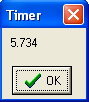
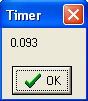
For example, the following code will generate a sqlite database in your macros folder with the name of TestExample1.db3. It will generate a small table and then insert 100 records without a transaction, then another 100 records within a transaction. Notice the huge difference in the timings:
$database = "$_AppData\macros\TestExample1.db3" If not(FileExists($database)) $data = sqlite("create",$database) EndIf $data = sqlite("open",$database) $data = sqlite("sql","create table if not exists test1 (field1 text)") $data = sqlite("sql","delete from test1") # first insert without a transaction $x = 0 Timer status=on while $x < 100 $data = sqlite("sql","insert into test1 values('" + "$x" + "')") $x = $x + 1 endwhile timer status=off # now with a transaction $x = 0 Timer status=on $data = sqlite("sql","begin") while $x < 100 $data = sqlite("sql","insert into test1 values('" + "$x" + "')") $x = $x + 1 endwhile $data = sqlite("sql","commit") timer status=off |
First insert:
Second insert
Use the system variable $d_CurrentDataPath for the fully qualified path to the current GSAK sqlite database which has the file name "sqlite.db3"
Note1 - The current database is already open by default, so you do not need to explicitly open it to run Sqlilte commands on it. However, if you have opened another database, but would still like to access the live GSAK tables, then the code would be:
$data = sqlite("sql","attach '$_CurrentDataPath\sqlite.db3' as GSAKdbf") |
Note2 - If you *do* need to access another database as well as the current database, then it is preferable to just use "attach" to access the other database(s). Doing so enables you to use the GSAK Transaction command which in turn allows you to use the Intransaction() function.
Note3 - GSAK automatically attaches a memory database called "gsak_mem" to the current database connection. This database is used internally (for speed optimization) but macro authors can also use it if they wish. For speed optimization I would recommend creating temporary working tables in the gsak_mem database (providing they are not too large). To use this database with the current database connection, just qualify any table with that database name. For example, to create a table of codes in the current filter:
$status = Sqlite("sql","drop table if exists gsak_mem.DbCodes") $status = Sqlite("sql","create table gsak_mem.DbCodes as select code from caches where rowid in (select * from gridtemp)") |
Note4 - Notice in the example given in Note3, to restrict the created table to only the records in the current/grid we have used the where of "rowid in (select * from gridtemp)". Gridtemp is a GSAK system table that always contains the rowids of the caches that are in our current filter/grid. So any time you need to write a query that only operates on caches that are in your current filter/grid, just add this where clause.
Alpha List Category List