|
GSAK (Geocaching Swiss Army Knife)
|
|
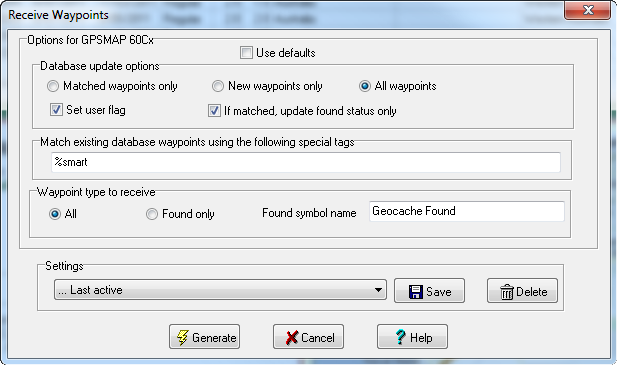
Use this option to receive waypoints from your GPSr, or a Lowrance/Magellan eXplorist file. ![]() Database update options Matched waypoints only - Only waypoints that are matched in your database are updated New waypoints only - Only new waypoints (unmatched in your database) are added New and/or matched - All waypoints from your GPSr are used Set user flag - User flag is set on import of this waypoint from your GPSr If matched, .... - If the GPSr waypoint is matched in the database, then the only item in the database that is updated is the found status (coordinates, symbol, etc are left unchanged) Match existing database waypoints using the following special tags Enter the special tags here that will determine if there is a matching database waypoint. You would normally enter the exact same special tags that you used on the send GPSr dialog for the "Waypoint name" Waypoints to receive All - All waypoints from your GPSr are received Found only - only waypoints that match the found symbol are received Found symbol name - Enter the name of the symbol that indicates this waypoint has been found Receive Device Direct from GPSr - Use the connected GPSr (as determined by "GPSr=>Setup") to receive the waypoints From file - Use for supported GPSr units that use a file store for waypoints (Explorist, Lowrance) |
|
Copyright 2004-2008 CWE Computer Services Privacy Policy Contact |