


Method for Matching Owned and Found Caches (Tools=>Options=>General)
Use these radio buttons to define the way of identifying you as the person who owns the cache. This same method is used when interrogating logs to adjust your found count and other information.
You have three options:
Exact Match: GSAK compares the "Geocaching name" to what you enter here. If the two match exactly, then GSAK recognizes this as a placed cache. (Case is not significant!)
Allow wild card match: Case is not significant; GSAK applies wild card matching. Wild cards supported are as follows:
* matches any substring (including null)
? matches any single character
# matches any numeric character (0..9)
@ matches any alphabetic character (A..Z, a..z)
$ matches any alphanumeric character
~ matches any non-alphanumeric, non-space character
Owner ID#: Becoming a user at geocaching.com involved selecting a user ID and password and a unique "Owner ID" number was then assigned (also known as "Member ID"). Your own number is shown on your geocaching.com profile (Note: you will need to log into your Geocaching.com account to see your "Member ID" at your "Account Settings", under "Membership"). To find another person's Geocaching Member ID browse to that users geocaching.com profile page and on the "Profile" tab hover the mouse pointer over the link "See the Forum Posts for This User" and inspect the URL (typically displayed by the browser and look for the large integer at the end of this URL after the last equal sign).
The easiest way update GSAK with your ID is to take the option "Geocaching.com access=>Update user information" as per the screen shot below:
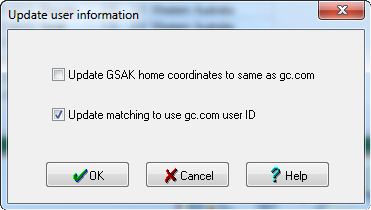
GSAK also allows for multiple owner ID's. If you want GSAK to recognize more than one ID then separate them with a ; (semi colon) for example 12345;12346
RegEx - Use a regular expression to match the name of person.